---
layout: page_v2
title: Line Item Manager
description: Prebid Line Item Manager Tool
sidebarType: 8
---
# Prebid Line Item Manager
## Introduction
The Prebid Line Item Manager is a command line tool built in Python to aid in creation of line items for Prebid header bidding integrations.
The goal of this tool is to allow publishers to save time, and prevent issues when creating the required Prebid line-item set up manually.
## Installation
**Note:** This tool requires Python 3 to be installed on your machine, and support is for Python>=3.6.
From your command line run:
```bash
pip install line-item-manager
```
If you already have it installed you can upgrade it using
```bash
pip install --upgrade line-item-manager
```
## Usage
### Configuration file
This tool uses a base (default) configuration as a starting point to create line items. You can create your own version of this and modify the parameters in it to suit your line item requirement. To see what the config file contains, run the command below:
```bash
line_item_manager show config
```
You can look at the full config in [the example configuration](https://github.com/prebid/line-item-manager/blob/master/line_item_manager/conf.d/line_item_manager.yml). To save time and build on the default config, create a new config file of your own using the following command:
```bash
line_item_manager show config > my_config.yml
```
Once you have your own file you can follow the comments in the file itself to manage the line item creation settings. You can do things like `creative`, `line item`, `order` setups, as well as options like `granularity` and `targeting`, etc. can all be input there. Please ensure you are using **YAML** syntax to make your updates.
### Examples (the \# indicates comments in the YAML syntax)
#### Creative setup
```yaml
creative: # at least one of the following types is required {video, banner}
banner:
# safe_frame: False # optional: defaults to True
# size_override: False # optional: defaults to True with a 1x1 creative
sizes: # list
- height: 250
width: 300
snippet:
video:
sizes: # list
- height: 480
width: 640
vast_xml_url: "https://my-pbs.example.com/cache?uuid=%%PATTERN:{{ hb_cache_id }}%%"
```
#### Order setup
```yaml
order:
name: "Prebid-{{ bidder_name }}-{{ media_type }}-{{ time }} {{ cpm_min }}-{{ cpm_max }}"
```
#### Line Item setup
```yaml
line_item:
name: "Prebid-{{ bidder_name }}-{{ media_type }}-{{ time }} @ {{ cpm }}"
item_type: "price_priority"
# Optional
# priority: 12 # default is 12
# start_datetime: "11/17/20 21:28"
# end_datetime: "12/17/20 21:28"
# timezone: "UTC"
```
#### Custom Granularity setup
```yaml
rate:
currency: "USD" # required
granularity:
type: "custom" # required, choices: "low", "med", "high", "auto", "dense", "custom"
custom: # optional, requires type "custom" above
- min: 0.10
max: 30.00
interval: 0.10
- min: 30.50
max: 50.00
interval: 0.50
# optional properties
# vcpm: 100000 # viewable impressions will be enabled
```
**Note:** The GAM Network ID, can also be input at runtime and will override the default Network ID in the config file.
## Line Item creation
When you are ready with the config file you can now use the create command to run the tool to create line items.
**Note: You will require at least one modifier (choosing bidder specific set of orders or single set of orders for all bidders)**
```bash
line_item_manager create my_config.yml --[bidder-code|--single-order]
```
### Examples
```bash
line_item_manager create my_config.yml -b rubicon
```
This would create a set of orders for bidder Rubicon
{:class="pb-xlg-img"}
```bash
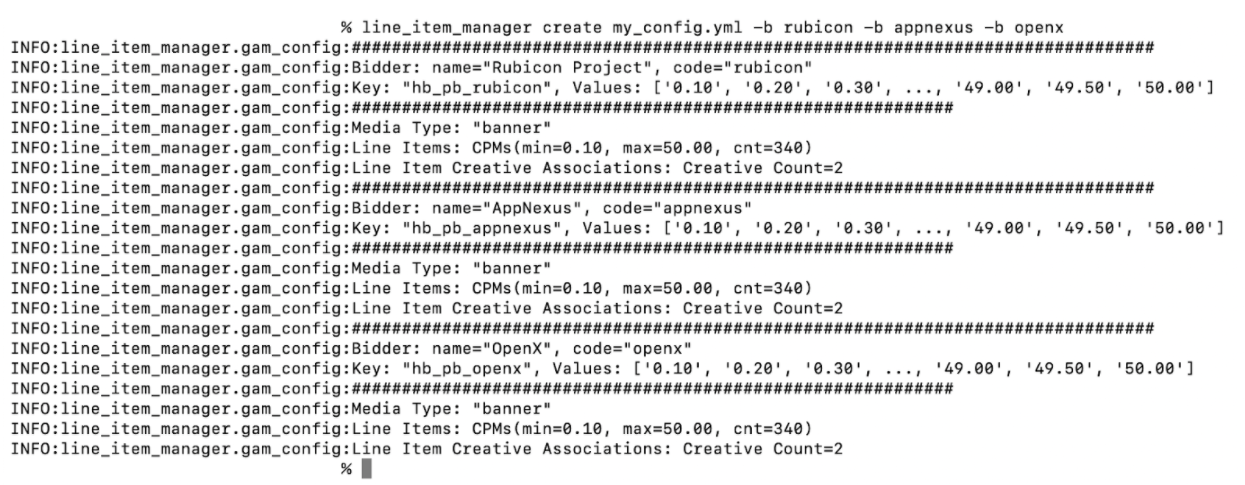
line_item_manager create my_config.yml -b rubicon -b msft -b openx
```
This would create a set of orders for bidders Rubicon, Microsoft and OpenX
{:class="pb-xlg-img"}
```bash
line_item_manager create my_config.yml --single-order
```
This would create a single set of orders with bidder agnostic key value targeting
{:class="pb-xlg-img"}
### Modifiers for _create_
The create function has certain modifiers that can be used to do dry runs and test runs for line item creation. Here are all the modifiers that can be used:
{: .table .table-bordered .table-striped }
| Modifier | Type | Description |
| ----------|------|-------------|
| --network-code | INTEGER | GAM network code, must reconcile with the network name. |
| --network-name |TEXT|GAM network name, must reconcile with the network code. |
| -k, --private-key-file |PATH |Path to json GAM credentials file. [default: gam_creds.json; required] |
| -s, --single-order||Create a single set of orders instead of orders per bidder. [default: False] |
| -b, --bidder-code |TEXT |Bidder code may be used multiple times. |
| -t, --test-run||Execute a limited number of line_items for testing and manual review. Please ensure that you archive the orders so as not to clash with the actual production orders and line items you wish to create. [default: False] |
| -n, --dry-run||Print commands that would be executed, but do not execute them. [default: False] |
| -q, --quiet||Logging is limited to warnings and errors. [default: False] |
| -v, --verbose||Verbose logging; use multiple times to increase verbosity. [default: False] |
| --skip-auto-archive||Upon failure or interruption, do NOT auto-archive already created orders. [default:False] |
### Commands for _line_item_manager_
{: .table .table-bordered .table-striped }
| Modifier | Description |
| ----------|-------------|
|create|Create line items|
|show|Show resources. Options: "config" or "bidders" |
All commands can use the `--help` modifier to see various options for the command
## Troubleshooting (Coming soon!)
## Git Repository
[github.com/prebid/line-item-manager](https://github.com/prebid/line-item-manager)
Contributing code? Found a bug? If you wish to push changes, please create a [Pull Request](https://github.com/prebid/line-item-manager/pulls) so we can review the change and approve.
Also, if you have a question or want to notify us about something, please create a github [issue](https://github.com/prebid/line-item-manager/issues).